
Reusing art pieces: paint it once, use it everywhere
One ladybug takes five lines of paint. Ten ladybugs shouldn't take fifty. Turn the ladybug into a recipe and each new one costs one line.
The big idea
A recipe (a function) gives a piece of art a name. Call the name with a spot, and the whole piece is painted there.
See it in code
This recipe has two slots, x and y. Every part of the ladybug is measured from them, so the whole bug moves together:
def ladybug(x, y):
    head_gap = 22
    half = 20
    spot_gap = 9
    circle(x=x, y=y - head_gap, size=18, color="black")
    circle(x=x, y=y, size=40, color="red")
    line(x1=x, y1=y - half, x2=x, y2=y + half, color="black", width=2)
    circle(x=x - spot_gap, y=y, size=8, color="black")
    circle(x=x + spot_gap, y=y, size=8, color="black")

paper("light sky blue")
rect(x=200, y=300, width=400, height=200, color="yellow green")
ladybug(x=90, y=250)
ladybug(x=200, y=320)
ladybug(x=310, y=260)
ladybug(x=150, y=360)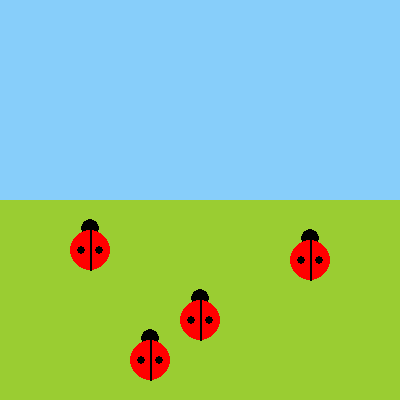
The head sits at y - head_gap, a little above the body, wherever the body is. Measure from the slots and a piece can go anywhere.
A recipe can use other recipes. This one paints a leaf, then a ladybug on top of it, as a single new piece:
def leaf(x, y):
    oval(x=x, y=y, width=90, height=46, color="forest green")

def ladybug(x, y):
    head_gap = 22
    spot_gap = 9
    circle(x=x, y=y - head_gap, size=18, color="black")
    circle(x=x, y=y, size=40, color="red")
    circle(x=x - spot_gap, y=y, size=8, color="black")
    circle(x=x + spot_gap, y=y, size=8, color="black")

def resting_ladybug(x, y):
    leaf(x=x, y=y)
    ladybug(x=x, y=y)

paper("light sky blue")
rect(x=200, y=300, width=400, height=200, color="yellow green")
resting_ladybug(x=110, y=260)
resting_ladybug(x=260, y=310)
resting_ladybug(x=160, y=360)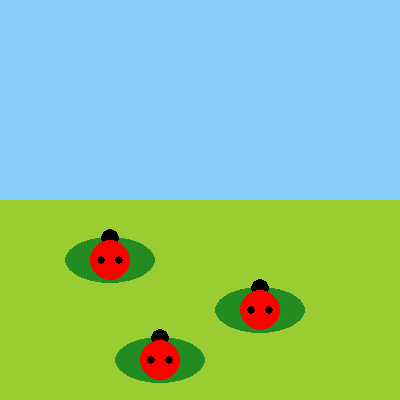
Inside resting_ladybug, the leaf is called first, so it lands behind the bug. The order of steps is still the order of layers.
Put a call inside a loop and one recipe makes a whole street. An extra slot, floors, gives each building its own height:
street_top = 340
floor_height = 30
block_count = 5
block_start = 45
block_gap = 78

def building(x, floors):
    height = floors * floor_height
    rect(x=x, y=street_top - height / 2, width=62, height=height, color="slate gray")
    for floor in range(floors):
        window_y = street_top - floor_height / 2 - floor * floor_height
        square(x=x - 14, y=window_y, size=12, color="gold")
        square(x=x + 14, y=window_y, size=12, color="gold")

paper("midnight blue")
moon(x=330, y=70, size=60, color="lemon chiffon")
rect(x=200, y=370, width=400, height=60, color="black")
for count in range(block_count):
    building(x=block_start + count * block_gap, floors=pick(3, 4, 5, 6, 7))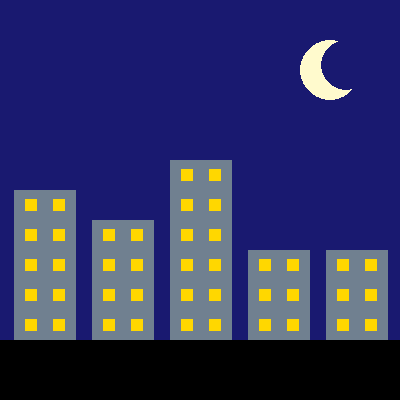
The recipe has its own loop inside, one trip per floor. So a taller building gets more windows, with no extra work from you.
This is how big programs get built. A game has one recipe to draw its ship and one to make a wave of rocks. It calls them whenever it needs to.
Try it yourself
Add a color slot to building with a default of "slate gray", and use it for the wall. Then paint one extra building in front with color="dark slate gray".
The common mistake
Using fixed numbers inside the recipe. Paint the head at y=178 and every bug's head lands in the same place. Use y - head_gap so the head follows the bug.
What it unlocks
Art pieces are functions with inputs. Place them back to front. Then let randomness make each one a little different.