
Layers and composition: paint from back to front
Put a sticker on a page, then another on top. The second one hides part of the first. Paint in code works the same way, and that one rule shapes every scene.
The big idea
Later lines paint on top of earlier ones. So you build a scene from back to front: far things first, near things last.
See it in code
The order of your lines is the order of your layers. Here the sun is painted first, then the sea is painted over its bottom half:
paper("light salmon")
circle(x=200, y=200, size=140, color="gold")
rect(x=200, y=300, width=400, height=200, color="turquoise")
Nothing was erased. The whole sun is still there. The sea was painted later, so it sits in front and covers the lower half.
Swap two lines and the picture changes, even though every shape is the same. This seaweed should be behind the fish, so it's painted first:
paper("dodger blue")
oval(x=150, y=240, width=24, height=260, color="sea green")
oval(x=250, y=260, width=24, height=230, color="sea green")
oval(x=330, y=290, width=24, height=170, color="sea green")
rect(x=200, y=380, width=400, height=40, color="sandy brown")
oval(x=140, y=220, width=60, height=80, color="dark orange")
oval(x=210, y=220, width=150, height=90, color="orange")
circle(x=250, y=208, size=14, color="white")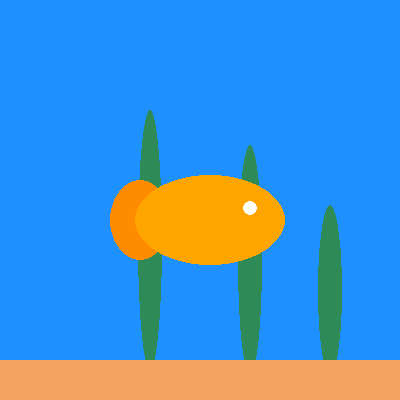
Move the three seaweed lines to the bottom and they cut across the fish instead. Ask yourself what's furthest away, and paint that first.
A big painting is easier in sections. A line starting with # is a note for people, called a comment. The computer skips it. Use comments to label each layer:
# ---- the sky ----
sky(top_color="indigo", bottom_color="dark orange")
circle(x=90, y=225, size=90, color="gold")

# ---- the far shore ----
rect(x=270, y=215, width=50, height=90, color="dark slate blue")
rect(x=322, y=230, width=40, height=60, color="dark slate blue")
rect(x=370, y=205, width=44, height=110, color="dark slate blue")

# ---- the sea ----
rect(x=200, y=330, width=400, height=140, color="midnight blue")

# ---- the front ----
box(x=180, y=335, width=110, height=24, color="saddle brown", corner=10)
line(x1=180, y1=323, x2=180, y2=262, color="white", width=4)
triangle(x=208, y=295, size=56, color="white")
The sections run from far to near: sky, shore, sea, then the boat. The sea is painted after the sun and the shore, so it hides their lower edges.
Game scenes are layered the same way, on every frame. Background first, then the pieces, then the score on top so nothing covers it.
Try it yourself
Move the whole # ---- the sea ---- section to the very top, above the sky, and run it. What disappears? Then put it back and add a second boat.
The common mistake
Painting the background last. A paper(), sky(), or big rect placed at the bottom of your code covers everything above it. Backgrounds always go first.
What it unlocks
Layers start with the paper. Once a scene has many parts, turn each one into a recipe and reuse it wherever you like.