
Giving functions inputs: one recipe, many results
A cookie recipe that only makes chocolate chip is a bit dull. Leave a blank for the flavor and one recipe makes them all. Function inputs are those blanks.
The big idea
A parameter is a named slot in a function. Each call fills the slots with its own values, so one recipe can do many jobs.
See it in code
The name inside the parentheses, flavor, is a slot. Each call puts a value in it, and the recipe uses whatever it was handed:
def bake_tray(flavor):
    print(f"Baking a tray of {flavor} cookies!")

bake_tray("chocolate chip")
bake_tray("oatmeal")Baking a tray of chocolate chip cookies! Baking a tray of oatmeal cookies!
The recipe never changed. Only the value in the slot did, and that changed the sentence.
A recipe can have more than one slot. Give a slot a default value with = and a call is allowed to leave it out:
def bake_tray(flavor, how_many=12):
    print(f"Baking {how_many} {flavor} cookies!")

bake_tray("chocolate chip")
bake_tray("oatmeal", 6)Baking 12 chocolate chip cookies! Baking 6 oatmeal cookies!
The first call gave no number, so the recipe used its default, 12. The second call filled both slots.
Slots can say where to paint and what color to use. This call style names each slot, so every value says what it is:
def butterfly(x, y, color="orchid"):
    wing_gap = 24
    oval(x=x - wing_gap, y=y, width=30, height=44, color=color)
    oval(x=x + wing_gap, y=y, width=30, height=44, color=color)
    oval(x=x, y=y, width=9, height=52, color="black")

paper("light sky blue")
rect(x=200, y=330, width=400, height=140, color="yellow green")
butterfly(x=90, y=120)
butterfly(x=300, y=90, color="orange")
butterfly(x=200, y=210, color="deep sky blue")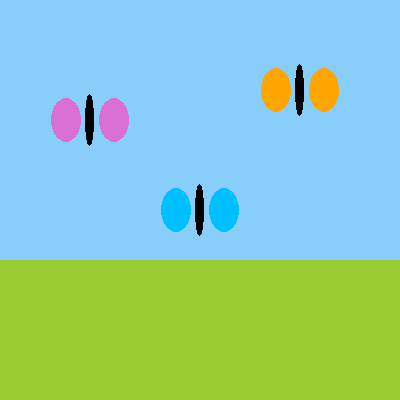
The first call left out color, so that butterfly is orchid, the default. The other two named their own.
Every paint command works this way. circle(x=200, y=200, size=60, color="gold") is a call that fills four slots. Now you know how to write commands of your own.
Try it yourself
Add a fourth call: butterfly(x=320, y=250, color="gold"). Then add a size slot to the recipe with a default, and use it for the wings' width.
The common mistake
Leaving out a slot that has no default. butterfly(color="red") stops with a TypeError, because the recipe still needs x and y. A call must fill every slot that doesn't have a default.
What it unlocks
Inputs go in, and next, answers come back out. Put a call inside a for loop and one recipe can paint a whole parade.