
Randomness in art: let the computer pick
Real fireworks never burst the same way twice. To paint that, you can't choose every spark yourself. You hand some of the choices to the computer.
The big idea
random_number(low, high) picks a number for you, and pick(list) picks one item from a list, fresh each time they're called.
See it in code
random_number(low, high) gives a whole number between two ends. Use one for x and one for y, and each spark lands somewhere new:
spark_count = 40

paper("midnight blue")
for count in range(spark_count):
    dot(x=random_number(20, 380), y=random_number(20, 250), color="white")
rect(x=200, y=365, width=400, height=70, color="black")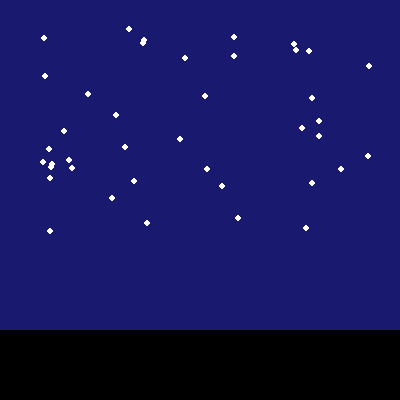
The y only goes up to 250, so the sparks stay in the sky. The two ends of random_number are how you keep chance inside the lines.
pick() chooses from a list that you wrote. That keeps the colors working together while each ring still gets a surprise:
ring_count = 12
burst_colors = ["hot pink", "deep sky blue", "gold"]

paper("midnight blue")
for count in range(ring_count):
    ring(x=random_number(40, 360), y=random_number(40, 240), size=random_number(20, 70), color=pick(burst_colors), width=3)
rect(x=200, y=365, width=400, height=70, color="black")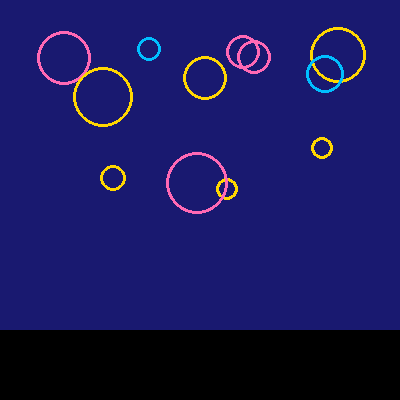
Three things are random now: where each ring goes, how big it is, and its color. The list keeps the picture from turning into a muddle.
Where you put a random pick matters. Pick above a loop and the choice is made once. Pick inside it and the choice is made on every trip:
burst_count = 2
spark_count = 24
spread = 80
zone_width = 200
burst_colors = ["gold", "orange red", "white"]

paper("midnight blue")
for show in range(burst_count):
    burst_x = show * zone_width + random_number(80, 120)
    burst_y = random_number(90, 190)
    for count in range(spark_count):
        end_x = burst_x + random_number(-spread, spread)
        end_y = burst_y + random_number(-spread, spread)
        line(x1=burst_x, y1=burst_y, x2=end_x, y2=end_y, color=pick(burst_colors), width=2)
        dot(x=end_x, y=end_y, color="white")
rect(x=200, y=365, width=400, height=70, color="black")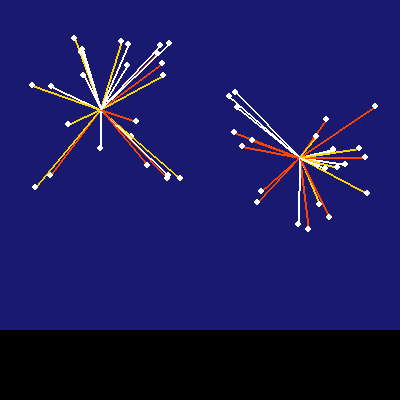
The center is picked once per burst, in the outside loop. Each spark's end is picked in the inside loop, 24 times. So the sparks share a center, and each flies its own way.
This rule works anywhere chance is used. A game picks a new spot each time a cupcake drops. A bakery program picks a new special each day.
Try it yourself
Move the burst_y line up above the for show line and run it a few times. Both bursts now sit at the same height. Why? Put it back where it was.
The common mistake
Giving random_number its numbers backwards. random_number(380, 20) has nothing to pick from, and the studio tells you to put the smaller number first.
What it unlocks
Random picks are the heart of generative art. In plain Python, the same tools come from the random module, and a list is what pick chooses from.