
The paper: where every painting starts
Every painting needs something to paint on. In the paint studio that's the paper: a square sheet you fill with color before anything else goes on top.
The big idea
The paper is a square, 400 steps wide and 400 steps tall. paper() fills all of it with one color, so it goes first.
See it in code
paper() takes one color name and fills the whole sheet. Everything you paint after it lands on top:
paper("light salmon")
circle(x=290, y=110, size=90, color="gold")
Two commands, two layers. The paper is the bottom layer, and the sun sits on it.
The paper ends at 400 across and 400 down. A shape can hang off the edge, and only the part on the paper shows:
paper("light sky blue")
rect(x=200, y=260, width=400, height=80, color="turquoise")
rect(x=200, y=350, width=400, height=100, color="sandy brown")
circle(x=0, y=400, size=260, color="tan")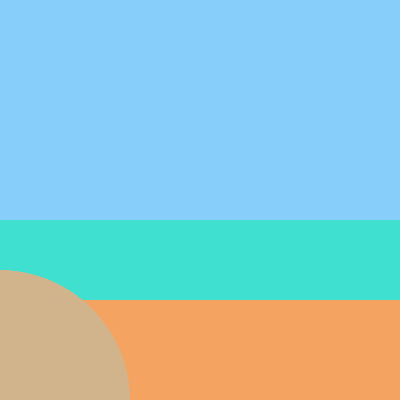
That dune is a circle centered on the corner, at x=0, y=400. Three quarters of it is off the paper, and the leftover quarter makes a hill.
sky() fills the paper as well, but with a blend. Give it a top color and a bottom color and it fades one into the other:
sky(top_color="indigo", bottom_color="dark orange")
circle(x=200, y=250, size=110, color="gold")
rect(x=200, y=330, width=400, height=140, color="midnight blue")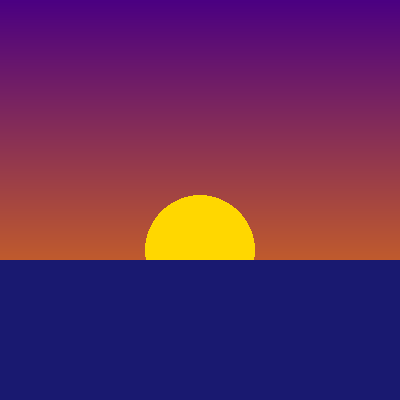
sky() and paper() do the same job: they cover everything. Use one of them at the very start, then build your scene on top.
A game works the same way. Its window is bigger, 640 by 480, and it repaints the background on every frame before drawing the pieces.
Try it yourself
Swap the two colors in sky() and run it. Is it sunrise or sunset now? Then move the sun's y to 150 and decide where the sea should start.
The common mistake
Calling paper() in the middle of a painting. It covers everything painted before it, so your shapes vanish. The paper goes first, once.
What it unlocks
Now learn to place things on the paper with x and y, fill it with shapes, and stack them in the right order with layers.