
X and Y: tell the computer exactly where
"Put it over there" is no help to a computer. It needs two numbers. One says how far across. The other says how far down. Together they name one exact spot.
The big idea
Every spot on the paper has two numbers: x is how far across from the left edge, and y is how far down from the top.
See it in code
grid() paints numbered lines so you can see the numbers. The paper is 400 wide and 400 tall. This ball sits at 200 across and 200 down, the very middle:
paper("sandy brown")
grid()
circle(x=200, y=200, size=60, color="royal blue")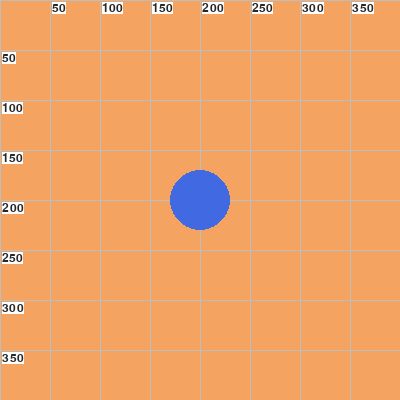
Find 200 along the top, then 200 down the side. Where those lines cross is the ball's center.
Here's the surprise: bigger y is lower. Both buoys have the same x. The one with the bigger y sits further down the paper:
paper("turquoise")
grid()
circle(x=200, y=100, size=30, color="red")
circle(x=200, y=300, size=30, color="orange")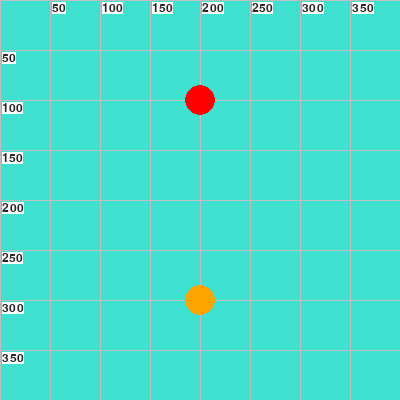
Y counts down from the top edge, like lines on a page. So y=100 is near the top and y=300 is near the bottom.
Give two shapes the same x and they line up, one above the other. That's how an umbrella's top sits exactly on its pole:
umbrella_x = 130

paper("light sky blue")
rect(x=200, y=250, width=400, height=80, color="turquoise")
rect(x=200, y=345, width=400, height=110, color="sandy brown")
rect(x=umbrella_x, y=320, width=6, height=110, color="white")
triangle(x=umbrella_x, y=250, size=110, color="medium purple")
circle(x=260, y=350, size=40, color="royal blue")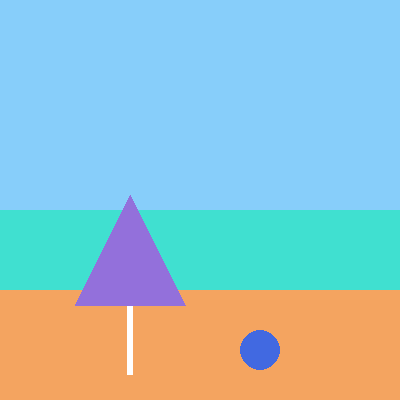
The pole and the top both read umbrella_x, so they can't drift apart. Change that one jar and the whole umbrella slides sideways.
X and y work the same way in a game. A basket sliding left is its x getting smaller. A cupcake falling is its y getting bigger, a little on every frame.
Try it yourself
Add grid() right after the paper line in the last painting and run it. Read off where the ball is. Then move the ball to sit under the umbrella.
The common mistake
Thinking a bigger y moves things up. It moves them down. If a shape lands too low, make its y smaller. And a spot past 400 is off the paper, where nobody can see it.
What it unlocks
With x and y you can place anything. Use math to measure one shape from another, and a loop inside a loop to fill a grid of spots. The paper itself is explained in the paper.