
Loops inside loops: rows and columns
One loop makes a row. Put a loop inside a loop and you get rows and columns: a whole grid from a few lines.
The big idea
When one loop sits inside another, the inside loop runs all the way through on every single trip of the outside loop.
See it in code
The outside loop picks a tray. For each tray, the inside loop runs from start to finish, placing every cookie:
for tray in range(2):
    for cookie in range(3):
print("Tray", tray, "cookie", cookie)Tray 0 cookie 0 Tray 0 cookie 1 Tray 0 cookie 2 Tray 1 cookie 0 Tray 1 cookie 1 Tray 1 cookie 2
cookie counted 0, 1, 2 twice, once for each tray. The inside loop starts over every time the outside loop takes a new trip.
Nested loops multiply. Count the trips and you get rows times columns:
trays = 4
cookies_per_tray = 6
baked = 0

for tray in range(trays):
    for cookie in range(cookies_per_tray):
        baked = baked + 1
print("Cookies baked:", baked)Cookies baked: 24
Four trips outside, six trips inside each one. That's 4 * 6, so the counting line ran 24 times.
Now turn those two counters into a spot. column sets how far across, and row sets how far down:
rows = 3
columns = 4
start_x = 65
start_y = 90
step_x = 90
step_y = 110
eye_gap = 10

paper("steel blue")
for row in range(rows):
    for column in range(columns):
        robot_x = start_x + column * step_x
        robot_y = start_y + row * step_y
        box(x=robot_x, y=robot_y, width=50, height=60, color="silver", corner=10)
        circle(x=robot_x - eye_gap, y=robot_y - 10, size=10, color="deep sky blue")
        circle(x=robot_x + eye_gap, y=robot_y - 10, size=10, color="deep sky blue")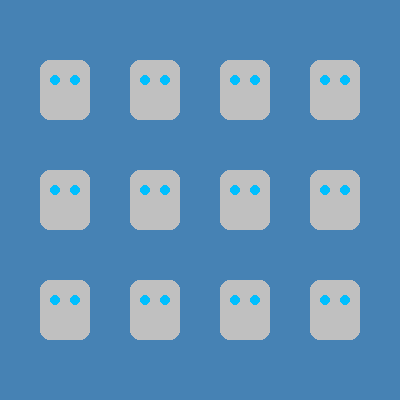
Every line pushed in under both loops ran for every robot. That's why all twelve got a body and two eyes.
Grids are everywhere. A wall of bricks in a game is rows and columns. So is a honeycomb, a checkerboard, and a quilt.
Try it yourself
Change rows = 3 to rows = 2 and columns = 4 to columns = 3. How many robots do you expect? Run it and count. Then try to guess the count for 5 rows and 2 columns.
The common mistake
Mixing up which counter goes where. If both x and y use row, the robots line up along a diagonal. Remember: x comes from column, and y comes from row.
What it unlocks
Nested loops are two for loops working together, each counting with range(). Add an if inside and each square of your grid can be different.