
For loops: write the steps once, run them many times
A for loop is your shortcut for doing something again and again. Write the steps once, and the loop repeats them for you.
The big idea
A for loop runs its pushed-in lines once for each item in a list, or once for each number in a count.
See it in code
A loop can walk through a list. Each trip around, the loop variable bake holds the next item, and the pushed-in line runs:
menu = ["brownie", "cookie", "muffin", "croissant"]

for bake in menu:
print("*", bake)* brownie * cookie * muffin * croissant
Four items, four trips, four lines. Add a fifth bake to the list and the loop prints it too, with no extra typing.
A loop can also just count. range(4) hands the loop the numbers 0, 1, 2, 3, one per trip:
for count in range(4):
    print("Into the oven: cookie number", count)
print("Tray is full!")Into the oven: cookie number 0 Into the oven: cookie number 1 Into the oven: cookie number 2 Into the oven: cookie number 3 Tray is full!
The loop counted from 0, not 1. The last line isn't pushed in, so it ran once, after the loop finished.
Now use the counter as a position. Each trip, count is one bigger, so each button lands a little further to the right:
button_count = 4
button_start = 155
button_gap = 30

paper("wheat")
box(x=200, y=255, width=150, height=130, color="silver", corner=18)
box(x=200, y=140, width=100, height=80, color="silver", corner=16)
circle(x=180, y=130, size=16, color="deep sky blue")
circle(x=220, y=130, size=16, color="deep sky blue")
smile(x=200, y=150, size=40, color="black", width=4)
for count in range(button_count):
    circle(x=button_start + count * button_gap, y=235, size=18, color="red")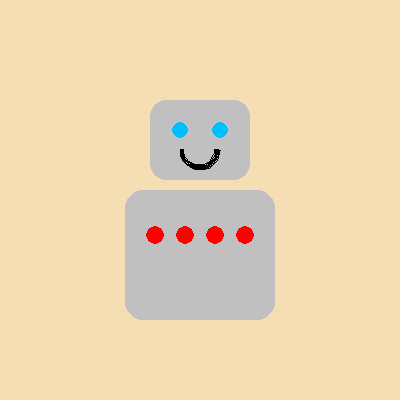
count * button_gap is 0, then 30, then 60, then 90. One line of paint became four buttons, each in its own spot.
A loop doesn't care what it repeats. The same idea prints a menu, paints a row of buttons, builds a wall of bricks in a game, or adds up a day of sales.
Try it yourself
Change button_count = 4 to button_count = 2 and run it. Then try 7. What happens when the buttons run past the robot's body? Can button_gap fix it?
The common mistake
Forgetting to use the counter. Write x=button_start with no count and every button lands in the same spot. It looks like one button, painted four times.
What it unlocks
Next, learn how range() counts, put a loop inside a loop to fill rows and columns, and keep a running total as a loop goes.