
If, elif, else: let your program decide
So far your programs do the same thing every time. An if changes that. It lets a program look at what's happening and choose what to do next.
The big idea
An if runs the pushed-in lines under it only when its check is true. else covers every other case, and elif adds choices in between.
See it in code
The lines pushed in under if run only when the check is true. The lines under else run when it's false. Exactly one of the two happens:
oven_temp = 300
ready_temp = 350

if oven_temp >= ready_temp:
    print("Oven ready, cookies in!")
else:
print("Still heating, wait a minute.")Still heating, wait a minute.
The check was false, so Python skipped the first message and ran the one under else. The spaces at the start of a line are how Python knows which lines belong to which choice.
elif means "else, if." It adds a middle choice. Python tries each check from the top and stops at the first true one:
how_many = 6
medium_order = 4
big_order = 10

if how_many >= big_order:
    print("Big order: packing a box!")
elif how_many >= medium_order:
    print("Medium order: a paper bag.")
else:
print("Small order: a napkin will do.")Medium order: a paper bag.
Six isn't 10 or more, so the first check failed. It is 4 or more, so the elif ran, and Python never looked at the else.
Put an if inside a loop and it decides again on every trip. Here it asks whether the column number is even, and picks each tile's color:
rows = 5
columns = 8
start_x = 40
start_y = 80
step_x = 45
step_y = 52

paper("sienna")
for row in range(rows):
    for column in range(columns):
        if column % 2 == 0:
            tile_color = "gold"
        else:
            tile_color = "orange"
        hexagon(x=start_x + column * step_x, y=start_y + row * step_y, size=60, color=tile_color)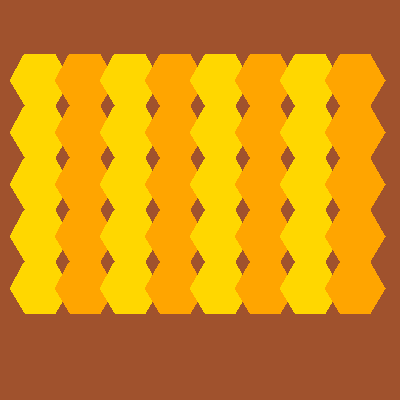
column % 2 is the leftover after dividing by 2. It's 0 for even columns, so those tiles turn gold. Every other tile gets the else answer.
Decisions are the same in every program. A shop checks if a bake is sold out. A game checks if the ball touched the paddle. A website checks if a menu is open.
Try it yourself
In the honeycomb, change column % 2 to (row + column) % 2 and run it. The stripes become a checkerboard, because neighbors now take turns in both directions.
The common mistake
Putting the checks in the wrong order. If how_many >= medium_order came first, an order of 12 would stop there and get a paper bag. Put the most specific check first.
What it unlocks
Every if needs a question, so get comfortable with comparing values. Then combine questions with and, or, not, or repeat a decision with a while loop.