
Lists: many values in one variable
A menu isn't one bake. It's a whole line-up of them. A list lets one variable hold many values, kept in order.
The big idea
A list holds many values in order, inside square brackets, under a single name.
See it in code
Square brackets make a list. Commas go between the items. len() counts how many are inside:
menu = ["brownie", "cookie", "muffin", "croissant"]
print(menu)
print("Bakes on the menu:", len(menu))['brownie', 'cookie', 'muffin', 'croissant'] Bakes on the menu: 4
Four values, one name. Printing the list shows everything inside it, brackets and all.
The word in asks whether something is in a list. It answers True or False, so it fits right into an if:
menu = ["brownie", "cookie", "muffin", "croissant"]

request = input("Looking for something? ").lower()
if request in menu:
    print(f"Yes! We have {request}.")
else:
print(f"Sorry, no {request} today.")Looking for something? Pie Sorry, no pie today.
Python checked every item for you. .lower() tidied the customer's typing first, so Pie and pie are treated the same.
A list can hold colors, too. Here a loop visits every position in palette and paints one stripe for each color:
palette = ["coral", "sea green", "slate blue", "goldenrod", "orchid"]
stripe_top = 80
stripe_height = 60

paper("linen")
for count in range(len(palette)):
    rect(x=200, y=stripe_top + count * stripe_height, width=340, height=stripe_height, color=palette[count])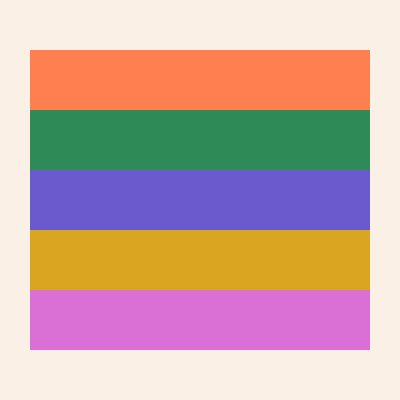
The loop asks len(palette) how many stripes to paint. Add a sixth color to the list and a sixth stripe appears.
Lists hold whatever a program has many of. The orders waiting in a line. The colors in a painting. The bricks in a wall. The squares of a snake's body.
Try it yourself
Swap two colors in palette and run it. The stripes swap too, because the order of a list is the order you type. Then add a color of your own.
The common mistake
Forgetting the quotes or commas. ["brownie" "cookie"] with no comma quietly glues the two words into one item. Every item needs its own quotes and a comma after it.
What it unlocks
Next, pull single items out with positions, grow and shrink a list with append and pop, and walk through every item with a for loop.